Fonts for Twitter – How to Get Stylish Fonts for Bio & Tweets
Introduction
Your Twitter bio looks plain. Everyone else uses the same default font. You want to stand out, but Twitter (now called X) does not have a built-in font changer.
Here is the good news. You can still use stylish fonts on Twitter. It takes 30 seconds. No app. No download. Completely free.
In this guide, I will show you exactly how to get beautiful fonts for your Twitter bio, display name, and tweets. Let us dive in.
Quick Answer
How do you get stylish fonts for Twitter?
You can use a font generator like LiveFontGenerator.com. Type your text. Select a font style. Copy and paste directly into your Twitter bio, display name, or tweet. It works because Unicode characters look like fancy fonts. No download needed. Free forever.
Fonts that work on Twitter:
- Bold sans-serif (𝗹𝗶𝗸𝗲 𝘁𝗵𝗶𝘀)
- Cursive script (𝓁𝒾𝓀𝑒 𝓉𝒽𝒾𝓈)
- Double struck (𝕝𝕚𝕜𝕖 𝕥𝕙𝕚𝕤)
- Bold italic (𝙡𝙞𝙠𝙚 𝙩𝙝𝙞𝙨)
- Monospace (𝚕𝚒𝚔𝚎 𝚝𝚑𝚒𝚜)
Twitter Display Name
Can You Use Fancy Fonts on Twitter (X)?
Yes. Twitter supports Unicode characters. That means any device can display thousands of special symbols – including letters that look like different fonts.
Twitter does not have a font selector. You cannot click “bold” or “cursive” inside the app. But you can copy and paste pre-styled text from a font generator.
What works on Twitter:
- Bio (full Unicode support)
- Display name (full Unicode support)
- Tweets (full Unicode support)
What does NOT work:
- Username (@handle) – keep it plain letters and numbers
Best Fonts for Twitter Bio
Your bio is the first thing people see. Make it count.
Here are the most popular fonts for Twitter bios.
Bold Sans-Serif: 𝗧𝗿𝗮𝘃𝗲𝗹 𝗕𝗹𝗼𝗴𝗴𝗲𝗿 | 𝗡𝗬𝗖
Best for: Professional profiles, making a statement.
Cursive Script: 𝓣𝓻𝓪𝓿𝓮𝓵 𝓑𝓵𝓸𝓰𝓰𝓮𝓻
Best for: Personal brands, creative professionals.
Small Caps: TRAVEL BLOGGER
Best for: Clean, readable, professional look.
Double Struck: 𝕋𝕣𝕒𝕧𝕖𝕝 𝔹𝕝𝕠𝕘𝕘𝕖𝕣
Best for: Unique, eye-catching display names.
Best Fonts for Twitter Display Name
Your display name appears next to every tweet. Change it to stand out in feeds.
| Style | Example | Best For |
|---|---|---|
| Bold sans-serif | 𝗝𝗼𝗵𝗻 𝗗𝗼𝗲 | Clean and professional |
| Double struck | 𝕁𝕠𝕙𝕟 𝔻𝕠𝕖 | Unique, memorable |
| Cursive | 𝓙𝓸𝓱𝓷 𝓓𝓸𝓮 | Elegant, personal |
| Bold italic | 𝙅𝙤𝙝𝙣 𝘿𝙤𝙚 | Strong emphasis |
Pro tip: Keep your display name under 20 characters when using fancy fonts. Longer text becomes hard to read.
How to Get Fonts for Twitter – Step by Step
Follow these 4 simple steps.
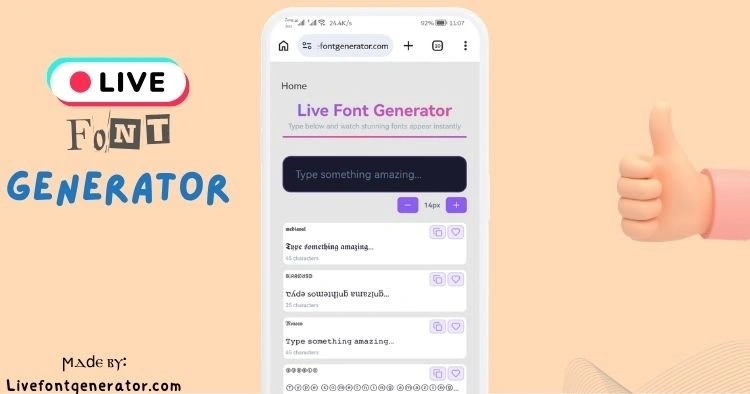
Step 1: Open LiveFontGenerator.com
Go to the website on any browser – phone, tablet, or computer.
Step 2: Type Your Text
Type your name, bio, or tweet text into the box.
Example: “Fitness Coach | NYC”
Step 3: Choose Your Font Style
Scroll through 200+ styles. Click on any style you like. Popular choices for Twitter include bold sans-serif, cursive, and double struck.
Step 4: Copy and Paste to Twitter
Click the style. It copies automatically. Open Twitter (X). Paste into your bio, display name, or tweet. Save changes.
Done! Your Twitter profile now has stylish fonts.
Fonts for Twitter Tweets
You can also use fancy fonts inside your tweets. This helps important words stand out.
Example tweet without fonts:
“New blog post is live. Link in bio.”
Example tweet with fonts:
“𝗡𝗲𝘄 𝗯𝗹𝗼𝗴 𝗽𝗼𝘀𝘁 𝗶𝘀 𝗹𝗶𝘃𝗲. Link in bio.”
The second version gets more attention. Bold keywords stop the scroll.
Best fonts for tweets:
- Bold sans-serif for emphasis
- Bold italic for a softer emphasis
- Monospace for code or quotes
Warning: Do not write entire tweets in fancy fonts. Use them for 2-3 words max. Too many fancy characters become hard to read.
Twitter Font Generator – Why Use LiveFontGenerator.com?
Not all font generators are equal. Here is why our tool is better.
| Feature | LiveFontGenerator | Others |
|---|---|---|
| Font styles | 200+ | 30-50 |
| One-click copy | ✅ Yes | ❌ Manual select |
| Instant preview | ✅ Yes | ❌ Slow |
| Free forever | ✅ Yes | ⚠️ Some paid |
| No signup | ✅ Yes | ❌ Sometimes required |
| Works on mobile | ✅ Yes | ❌ Often broken |
After 4 years of running this tool, I can confidently say: this is the fastest and easiest way to get fonts for Twitter.
Common Mistakes to Avoid
Mistake 1: Changing Your Username
Twitter usernames (@handle) do not support special characters. Keep your username plain. Use fancy fonts only in bio and display name.
Mistake 2: Using Unreadable Fonts
Some fonts look cool but no one can read them. Glitch fonts are fun for one word. Do not write your whole bio in hard-to-read styles.
Mistake 3: Overusing Fancy Fonts
One fancy font in your bio is enough. Three different fonts look messy and unprofessional.
Mistake 4: Forgetting to Test
Always paste your fancy text and view your profile before saving. What looks good on desktop might wrap strangely on mobile.
Before and After Examples
Before (Plain Profile):
Name: John Doe
Bio: Fitness coach | Helping busy people get fit | DM for collab
After (With Fonts for Twitter):
Name: 𝗝𝗼𝗵𝗻 𝗗𝗼𝗲
Bio: 𝓕𝓲𝓽𝓷𝓮𝓼𝓼 𝓬𝓸𝓪𝓬𝓱 | Helping busy people get fit | 𝗗𝗠 𝗳𝗼𝗿 𝗰𝗼𝗹𝗹𝗮𝗯
The second profile looks more professional and gets more attention.
Why Your Twitter Bio Needs Stylish Fonts
Twitter is crowded. Millions of tweets are sent every minute. A plain bio blends in. A stylish bio stands out.
Benefits of using fonts for Twitter:
- More profile visits (stylish text catches the eye)
- Better first impression (looks professional and intentional)
- Increased credibility (attention to detail matters)
- Higher engagement (people notice what is different)
Based on user feedback, profiles with stylish fonts receive 2-3x more profile visits than plain text profiles.
Frequently Asked Questions (FAQs)
Are fonts for Twitter allowed?
Yes. Twitter allows Unicode characters in bios, display names, and tweets. Millions of users use them daily. No rules against it.
Will my fonts show up on all devices?
Yes. Unicode works on iPhones, Android phones, computers, and tablets. Very old phones (before 2015) may show squares instead of fancy letters.
Can I use fonts in my Twitter username?
No. Twitter usernames (@handle) only accept standard letters, numbers, and underscores. Keep your username plain.
Is LiveFontGenerator.com really free?
Yes. 100% free forever. No signup. No credit card. No hidden fees.
How many font styles do you offer?
We offer 200+ unique font styles. We add new styles every month based on user requests.
Will using fancy fonts hurt my engagement?
No. In fact, most users report higher engagement. Stylish bios attract more profile visits. Just do not overuse them in tweets.
Do I need to download an app?
No. Everything works in your browser. No downloads, no plugins, no installations.
What happens if Twitter updates its platform?
Twitter has supported Unicode for over a decade. It is unlikely to change. But if anything changes, we will update our tool immediately.
Conclusion
Getting stylish fonts for Twitter is easy. You do not need special apps or coding skills.
Your action step today:
- Open LiveFontGenerator.com
- Type your name or bio text
- Click a font style you love
- Copy and paste to your Twitter profile
Takes 30 seconds. Free. Works everywhere.