How to Make Your Text Bold on Social Media – Unicode vs Real Bold
Social media apps do not all handle bold text in the same way. Some platforms provide native formatting in certain areas, while others display plain text without a traditional Bold button.
That is why you may have seen text like this in bios, captions, posts, or messages:
Normal: Hello World
Unicode style: 𝗛𝗲𝗹𝗹𝗼 𝗪𝗼𝗿𝗹𝗱
They may look similar to normal bold formatting, but technically they are not the same thing.
This guide explains how Unicode bold-style text works, how to create it, where to use it, and why you should test it before relying on it.
Quick Answer
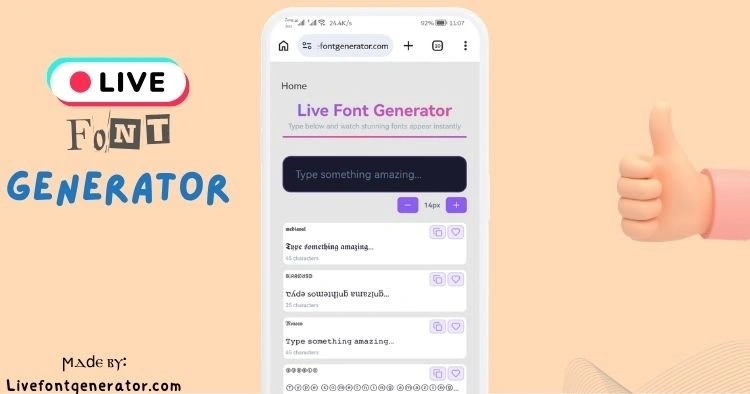
If a social platform does not provide the formatting you want, you can create bold-looking Unicode text with LiveFontGenerator.com:
- Enter your normal text.
- Find a bold-looking style.
- Copy the converted text.
- Paste it into the platform you want to use.
- Check how it appears before publishing.
The important detail is that the generator is usually changing the characters, not applying a font-weight setting.
Is Unicode Bold the Same as Real Bold?
No.
This is one of the most important things to understand about copy-and-paste font generators.
Consider:
Normal:
Hello
HTML/CSS bold:
Hello displayed using a bold font weight
Unicode-style version:
𝗛𝗲𝗹𝗹𝗼
With HTML or a rich-text editor, the underlying letters can remain ordinary Latin characters while formatting controls their appearance.
Unicode-style text works differently.
For example:
| Version | Character |
|---|---|
| Normal H | H |
| Mathematical Sans-Serif Bold H | 𝗛 |
| Normal e | e |
| Mathematical Sans-Serif Bold e | 𝗲 |
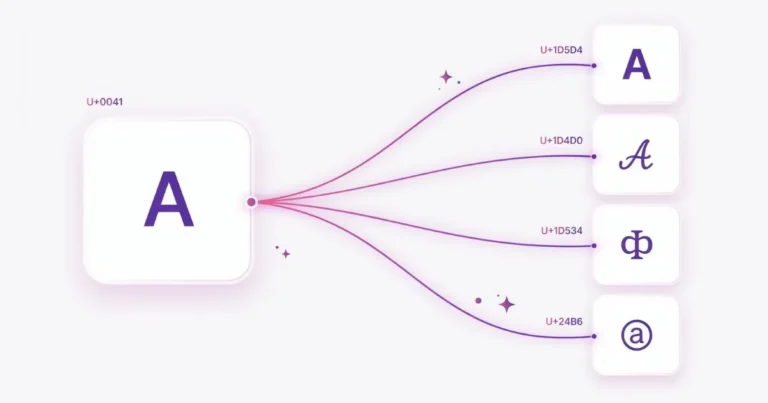
The styled characters are separate Unicode code points rather than ordinary letters with a bold font applied.
This distinction explains why you can copy the visual style from one application and paste it into another.
Where Do These Bold-Looking Characters Come From?
Many styles commonly used by font generators come from Unicode’s Mathematical Alphanumeric Symbols and related character blocks.
These include character sets that visually resemble:
- Bold
- Italic
- Bold Italic
- Script
- Bold Script
- Fraktur
- Double-struck
- Sans-serif
- Sans-serif Bold
- Monospace
An important technical detail is often missed in social-media font guides: these mathematical alphabets were designed to represent meaningful distinctions in mathematical and technical notation.
Using them to imitate styled ordinary text is a popular modern use, but it was not their original purpose.
That is one reason Unicode-style text should be used selectively rather than as a replacement for ordinary text everywhere.
How to Create Bold-Looking Text
Step 1: Enter Your Text
Open LiveFontGenerator.com and type the text you want to convert.
For example:
New collection available today
The generator creates different Unicode versions of the input as you type.
Step 2: Choose a Readable Bold Style
Depending on the characters in your text, you may see options resembling:
| Style | Example |
|---|---|
| Sans-Serif Bold | 𝗛𝗲𝗹𝗹𝗼 |
| Sans-Serif Bold Italic | 𝙃𝙚𝙡𝙡𝙤 |
| Mathematical Bold | 𝐇𝐞𝐥𝐥𝐨 |
| Bold Script | 𝓗𝓮𝓵𝓵𝓸 |
These styles do not have identical character coverage, so the result can vary depending on the letters, numbers, punctuation, and symbols in your input.
Step 3: Copy the Result
Choose the version you want and copy it.
Because the result consists of Unicode characters, the visual appearance can usually travel with the copied text instead of depending on a font file installed by LiveFontGenerator.
Step 4: Paste and Test
Paste the result into the bio, caption, post, message, or other field where you want to use it.
Do not assume that every style will behave identically everywhere.
Check the final result before publishing.
Where Can You Use Unicode Bold Text?
Unicode text can be accepted by many modern apps and websites because Unicode itself is widely supported.
However, accepting a character and displaying it exactly as expected are two different things.
A practical way to think about compatibility is:
| Location | Recommendation |
|---|---|
| Display names | Test before saving |
| Bios | Usually suitable for short emphasis |
| Captions | Use selectively |
| Posts | Suitable for short headings or emphasis |
| Comments | Test first |
| Messages | Usually better to use native formatting when available |
| Hashtags | Prefer normal characters |
| @handles/usernames | Prefer normal characters |
| URLs | Do not substitute decorative characters |
| Important information | Prefer normal text |
Platform rules and supported fields can change, so it is safer to test the exact text in the exact field where you plan to use it.
Bold Text on Instagram
Instagram does not provide a traditional rich-text formatting toolbar for ordinary bio and caption text.
That is one reason users copy Unicode characters into these areas.
For example:
Travel photographer
could visually become:
𝗧𝗿𝗮𝘃𝗲𝗹 𝗽𝗵𝗼𝘁𝗼𝗴𝗿𝗮𝗽𝗵𝗲𝗿
A sensible approach is to use styled text for a short name, heading, or phrase while keeping important descriptive information in ordinary characters.
For example:
Better use:
𝗧𝗿𝗮𝘃𝗲𝗹 𝗣𝗵𝗼𝘁𝗼𝗴𝗿𝗮𝗽𝗵𝗲𝗿
London & Europe
New photos every week
This preserves the visual emphasis without converting the entire bio.
Avoid assuming that every Unicode character will be accepted in every Instagram field. Usernames and other restricted fields can have different character rules from display text.
Bold Text on Facebook
Unicode-style characters can also appear in Facebook text fields where those characters are accepted.
For example:
𝗡𝗲𝘄 𝗽𝗼𝘀𝘁
may be used as a visual heading followed by normal text.
Again, there is an important difference between Facebook applying bold formatting and Facebook simply displaying Unicode characters that already have a bold-looking appearance.
For ordinary long-form writing, standard text is generally the safer choice.
Bold Text on WhatsApp: Use Native Bold When Possible
WhatsApp deserves special attention because you often do not need Unicode characters just to make a message bold.
WhatsApp provides native text formatting.
For example, writing a supported bold formatting sequence around a word can display that word in bold inside a message.
Native formatting is usually preferable when your goal is simply to emphasize part of a WhatsApp conversation.
Unicode-style text can still be useful when you specifically want decorative copy-and-paste characters, but it should not be confused with WhatsApp’s built-in bold formatting.
So there are two different concepts:
Native formatting:
Ordinary characters + formatting instructions
Unicode-style text:
Different characters that already have a bold-looking appearance
What About X, TikTok, Discord, LinkedIn and Telegram?
The same basic rule applies:
Test the exact characters in the exact field before relying on them.
A platform may accept Unicode in a post while applying stricter rules to usernames, handles, hashtags, search fields, or other account information.
This is why a simple claim such as “Unicode fonts work everywhere” is misleading.
Unicode support is widespread, but character support, rendering, restrictions, fonts, and accessibility behavior can vary.
Why Does Bold Text Sometimes Show as □?
Sometimes a styled character may appear as:
□
or as another missing-character symbol.
This usually means the software or available font cannot display the requested character with a suitable glyph.
Think of Unicode as assigning an identity to a character.
A font still needs to provide a visual glyph that can be drawn on the screen.
If suitable glyph support is missing, the device may display a replacement symbol instead.
Updating your operating system, browser, or app may help in some situations, but an update does not guarantee that every Unicode character will become available.
The safer solution is to try a simpler style or use ordinary text.
Why Text Can Look Different on Two Devices
The Unicode character can remain the same while its visual representation changes.
Your phone might use one font to display:
𝗛
while another operating system or application uses a different font.
Differences can include:
- stroke thickness
- spacing
- character width
- shape
- alignment
- fallback font
Therefore, “it looks correct on my phone” does not guarantee pixel-for-pixel identical rendering on every device.
Accessibility: An Important Limitation
Decorative Unicode text should be used carefully when accessibility matters.
A visually bold Unicode character is not simply an ordinary letter with visual styling applied. It can be a different encoded character.
Assistive technologies may therefore interpret styled Unicode text differently from ordinary text depending on the software and context.
For important information, instructions, navigation, names that need to be searchable, or long passages, ordinary characters are the safer choice.
A practical rule is:
Use decorative Unicode for optional visual emphasis, not for information someone must be able to read or understand.
For example:
Better:
🔥 𝗡𝗘𝗪 𝗥𝗘𝗟𝗘𝗔𝗦𝗘
Our new guide is available today.
Less useful:
Converting an entire multi-paragraph announcement into decorative Unicode characters.
Do Unicode Fonts Improve Engagement?
There is no reliable rule that changing ordinary text into Unicode bold characters will increase engagement.
Styled text may make a short phrase more visually noticeable, but engagement depends on many factors, including:
- content quality
- relevance
- audience
- timing
- image or video quality
- platform recommendations
- clarity of the message
For that reason, we do not recommend using Unicode bold text because of an assumed engagement boost.
Use it when the visual emphasis genuinely improves the content.
Should You Use Unicode Characters in Hashtags?
Normal characters are the safer choice for hashtags.
A character that looks like a normal Latin letter may actually be a completely different Unicode character.
For example, a mathematical bold letter and its ordinary Latin equivalent are separate characters even though they can look similar.
If discoverability matters, keep hashtags simple:
#Photography
rather than converting the letters into decorative mathematical characters.
The same principle is useful for search-sensitive text.
Should You Use Unicode Bold in Usernames?
Use caution.
Platforms can impose their own restrictions on usernames and account identifiers, and those rules can be different from the rules for display names or bios.
A decorative character being accepted in a bio does not mean it will be accepted in a username.
For important account identifiers, plain characters are usually the most reliable choice.
When Unicode Bold Is Useful
Unicode styles work best as a small visual accent.
Good candidates include:
- short headings
- display-name decoration
- a short phrase in a bio
- announcement labels
- optional decorative text
- short calls to action
For example:
𝗡𝗘𝗪 𝗚𝗨𝗜𝗗𝗘
followed by ordinary text is more readable than converting the entire post.
When You Should Avoid It
Prefer ordinary text when writing:
- long paragraphs
- accessibility-critical information
- URLs
- email addresses
- hashtags intended for discovery
- important instructions
- legal or safety information
- text that must be reliably searchable
- account identifiers
Decorative text should enhance communication rather than make communication harder.
Common Mistakes
1. Converting the Entire Post
A little visual contrast can be useful. Several paragraphs of decorative Unicode become harder to read.
2. Assuming It Is a Font
Copy-and-paste generators generally do not install a new font on Instagram, Facebook, or another platform.
They transform compatible characters into other Unicode characters.
3. Assuming It Works Everywhere
Unicode is a standard, but rendering depends on fonts, software, operating systems, apps, and platform restrictions.
Always test unusual styles.
4. Using Decorative Characters for Important Information
If a sentence must be understood by everyone, normal text is the safer option.
5. Assuming Bold Text Increases Engagement
Visual emphasis and increased engagement are not the same thing.
Use styled text for presentation, not as a guaranteed growth technique.
Frequently Asked Questions
Is LiveFontGenerator.com free?
Yes. The generator can be used without installing a font package or desktop application.
Is Unicode bold a real font?
Not in the way people usually mean when talking about fonts such as Arial or Times New Roman.
Many copy-and-paste styles substitute ordinary letters with different Unicode characters that have a styled mathematical appearance.
Will bold Unicode text work on every phone?
Not necessarily.
Modern devices support large portions of Unicode, but the appearance and availability of individual glyphs can depend on the operating system, font, browser, application, and software version.
Why do I see boxes instead of letters?
The font or software being used to render the text may not contain a suitable glyph for that character. Try a simpler Unicode style or return to ordinary text.
Is Unicode bold the same as WhatsApp bold?
No.
WhatsApp can apply native formatting to ordinary text. Unicode bold-looking text uses different encoded characters.
Can I use Unicode text in an Instagram bio?
Many Unicode characters can appear in bio text, but you should test your chosen style before saving it and avoid using decorative characters for critical information.
Does Unicode bold increase social-media engagement?
There is no guaranteed engagement increase from using Unicode characters. Use them for visual emphasis rather than as a growth strategy.
Is Unicode bold accessible?
Accessibility behavior varies between assistive technologies and contexts. Because styled Unicode characters are different encoded characters rather than ordinary letters with visual formatting, normal text is preferable for important or long-form information.
Final Takeaway
Bold-looking social-media text is more interesting technically than it first appears.
When you copy:
𝗛𝗲𝗹𝗹𝗼
you are generally not telling Instagram, Facebook, or another platform to make the ordinary word Hello bold. You are pasting different Unicode characters whose glyphs have a bold appearance.
That is why the style can survive copy and paste—but it is also why compatibility and accessibility deserve attention.
Use Unicode styles for short, optional visual emphasis. Keep important information in normal text, use native formatting when a platform provides it, and test decorative characters before publishing.
If you want to experiment with the difference yourself, type a short phrase into LiveFontGenerator.com, compare the normal and bold-looking versions, and paste both into the platform you use.



One Comment