Live Font Generator: Create 200+ Stylish Fonts Instantly
Quick Answer
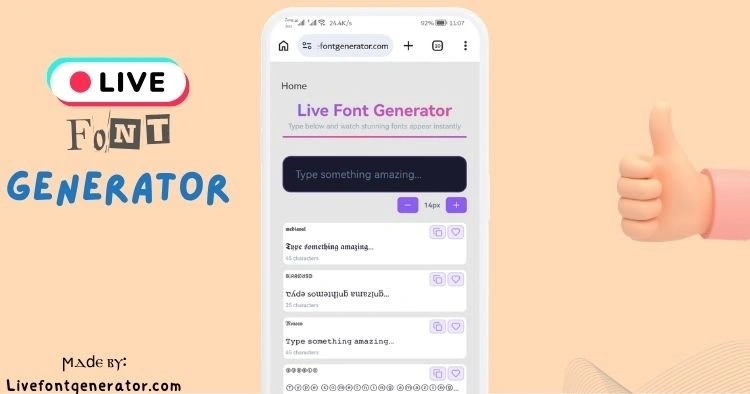
A stylish font generator converts your plain text into decorated Unicode characters that you can copy and paste into Instagram bios, Discord usernames, TikTok captions, gaming profiles, and any other platform that accepts text. The styled text is not a font in the traditional sense — it is a set of special characters from the Unicode standard that look like different typefaces but behave like normal text. Type your text once, preview every style side by side, and copy the one you want. No downloads, no signup, completely free.
How Stylish Fonts Actually Work
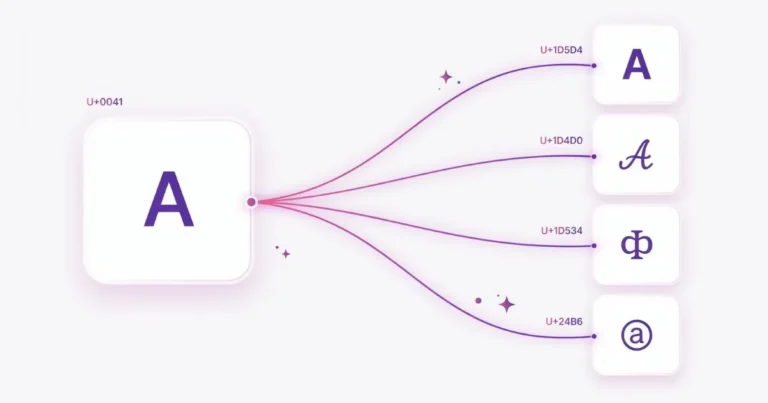
When you see a cursive Instagram bio or a gothic Discord server name, no special font was installed. What happened is simpler and more clever: each regular letter was replaced with a visually similar character from a different section of the Unicode character set.
Unicode — the international standard that defines every character your devices can display — includes entire alphabets that were originally created for mathematical notation. Mathematical Bold, Mathematical Italic, Mathematical Script, Mathematical Fraktur, and several others each contain a full set of A-Z and a-z characters. These characters exist as their own code points, completely separate from regular letters.
A stylish font tool maps your input letters to their equivalents in these mathematical alphabets. Your “Hello” becomes “𝓗𝓮𝓵𝓵𝓸” — five different Unicode characters that happen to look like cursive versions of those letters. Because the output is real characters (not images or formatting), it copies and pastes into any text field on any device.
What Styles Are Available?
The Unicode standard provides over a dozen complete alternative alphabets, and combining marks add dozens more effects. Here are the major categories with examples:
| Style Category | Example | Best Used For |
|---|---|---|
| Bold Serif | 𝐇𝐞𝐥𝐥𝐨 𝐖𝐨𝐫𝐥𝐝 | Professional emphasis, headlines |
| Bold Sans | 𝗛𝗲𝗹𝗹𝗼 𝗪𝗼𝗿𝗹𝗱 | Clean modern look, business profiles |
| Italic | 𝐻𝑒𝑙𝑙𝑜 𝑊𝑜𝑟𝑙𝑑 | Subtle emphasis, quotes |
| Cursive Script | 𝓗𝓮𝓵𝓵𝓸 𝓦𝓸𝓻𝓵𝓭 | Instagram bios, personal branding |
| Light Script | 𝒽ℯ𝓁𝓁ℴ 𝓌ℴ𝓇𝓁𝒹 | Delicate aesthetic, soft branding |
| Gothic Fraktur | 𝔥𝔢𝔩𝔩𝔬 𝔴𝔬𝔯𝔩𝔡 | Gaming, dark aesthetic, Discord |
| Bold Fraktur | 𝖍𝖊𝖑𝖑𝖔 𝖜𝖔𝖗𝖑𝖉 | Heavy gothic, competitive gaming |
| Double-Struck | ℍ𝕖𝕝𝕝𝕠 𝕎𝕠𝕣𝕝𝕕 | Outline aesthetic, artistic profiles |
| Monospace | 𝙷𝚎𝚕𝚕𝚘 𝚆𝚘𝚛𝚕𝚍 | Tech profiles, developer bios |
| Small Caps | ʜᴇʟʟᴏ ᴡᴏʀʟᴅ | Minimal, clean, professional |
| Circled | Ⓗⓔⓛⓛⓞ Ⓦⓞⓡⓛⓓ | Playful, casual, fun profiles |
| Strikethrough | H̶e̶l̶l̶o̶ W̶o̶r̶l̶d̶ | Humorous edits, corrections |
| Underlined | H̲e̲l̲l̲o̲ W̲o̲r̲l̲d̲ | Emphasis without bold |
Beyond these base alphabets, tools combine styled letters with decorative Unicode symbols — sparkles (✧), hearts (♡), stars (⋆), crowns (♛) — to create framed styles like ✧・゚: *✧ 𝓗𝓮𝓵𝓵𝓸 ✧ *:・゚✧ that are popular in Instagram and TikTok bios.
For styles organized by visual category — bold together, cursive together, gothic together — a font style generator lets you browse by mood rather than scrolling through an unsorted list. For styles with randomized decorative frames, a fancy text generator shuffles symbol combinations so you can find a decoration nobody else is using.
Where Do Stylish Fonts Work?
Because styled characters are part of the Unicode standard, they work on virtually every modern platform and device. Here is a platform-by-platform breakdown:
Styled text works in bios, captions, comments, stories, and direct messages. Instagram usernames (the @handle) are restricted to plain letters, numbers, periods, and underscores — style your display name and bio instead. Cursive and aesthetic styles dominate Instagram because they match the platform’s visual culture.
TikTok
Bios and display names both support Unicode. TikTok has an 80-character bio limit — the shortest of any major platform — so use styled text sparingly. One styled name or tagline paired with plain descriptive text works better than styling everything.
Discord
Discord is the most Unicode-friendly major platform. Server names, display names, channel names, role names, and About Me sections all accept styled characters. Gothic Fraktur is the dominant style on Discord, particularly in gaming and community servers. For Discord-specific formatting (including automatic channel-name lowercase handling), a dedicated Discord fonts tool handles the platform’s unique requirements.
WhatsApp and Telegram
Status messages, About fields, group descriptions, and individual messages all support Unicode styled text. WhatsApp has a 139-character About limit. Group descriptions have more room and are a good place for styled server branding if you run community groups.
X (Twitter)
Display names, bios, and tweets all support Unicode. X is one of the most permissive platforms for styled text — even the display name field accepts full Unicode, making it possible to have a bold or cursive name that appears in every tweet and reply.
Gaming Platforms
Steam display names, Roblox display names, Fortnite display names, and Twitch display names all support various levels of Unicode. Account usernames (login handles) are typically restricted to ASCII, but the display name — what other players actually see — usually accepts styled characters. Gothic and bold styles dominate gaming communities.
YouTube
Channel names and video descriptions support Unicode. Bold and small caps styles work well for YouTube because they scale clearly across the range of screen sizes where YouTube content is consumed.
How to Choose the Right Style
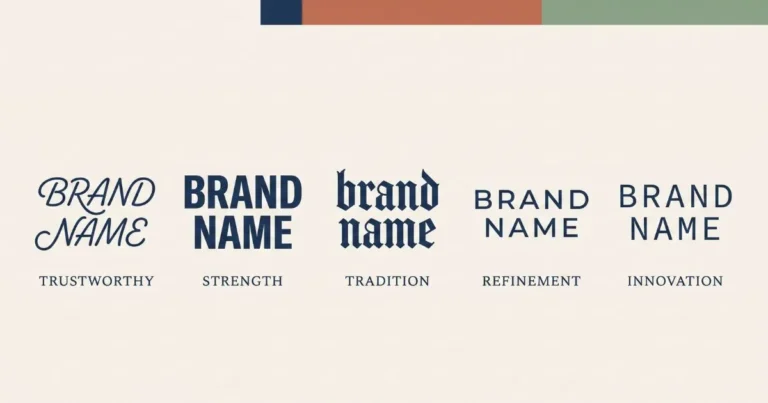
Choosing a stylish font is a design decision, not just a decoration choice. The style you pick communicates something about your account before anyone reads a word of your content.
Match Style to Platform Culture
Cursive works everywhere but thrives on Instagram. Gothic dominates Discord and gaming. Bold sans-serif fits business and professional contexts. Aesthetic outline styles belong in art and photography communities. Using a style that matches the platform’s culture makes it look intentional; mismatching it makes it look random.
One Styled Element Per Bio
The most effective bios style one element — usually the name or a key tagline — and leave everything else in plain text. Two styled elements is the maximum before the bio starts looking cluttered. Three or more different styles in one bio signals chaos, not creativity.
Readability Over Decoration
Some styles look striking at large sizes but become illegible at mobile bio font sizes (typically 13-16px). Bold serif, bold sans, and cursive script remain readable at small sizes. Thin light script, heavy zalgo, and multi-combining-mark effects often do not. Always preview your styled text at actual display size on a phone before committing to it.
Test Cross-Device
Apple and Google render Unicode characters using different system fonts, so the same styled text can look slightly different on iPhone vs Android. The mainstream mathematical alphabets (bold, italic, script, Fraktur, double-struck, monospace, small caps) render consistently across all modern devices. More exotic character blocks occasionally show as empty boxes on budget Android devices with minimal font coverage.
Accessibility Considerations
Screen readers — the software blind and low-vision users rely on — do not always handle styled Unicode characters well. Instead of reading “Hello” they may announce each character by its full Unicode name: “mathematical bold capital H, mathematical bold small e…” This makes styled bios difficult or impossible for screen reader users to understand.
The responsible approach: style decorative elements (your name, a tagline, one emphasized word) and keep informational content in plain text. This preserves the visual personality of styled text without excluding users who rely on assistive technology.
Styled Fonts vs Downloaded Fonts — What Is the Difference?
A downloaded font (.OTF, .TTF, .WOFF) is a file that your design software uses to draw characters in a specific visual style. You need to install the font, and it only works in applications that support custom fonts — Photoshop, Canva, Word, web browsers with CSS.
Styled Unicode text is different. It is not a font file — it is text made of special characters that already exist in every device’s built-in character set. You cannot install it because there is nothing to install. You just copy the characters and paste them wherever text is accepted.
This is why Unicode styled text works in places where custom fonts cannot reach — Instagram bios, gaming usernames, Discord server names, and any other text field that does not support font selection.
Frequently Asked Questions
Q: Are stylish fonts free to use?
Yes. Unicode characters are a public international standard. Any tool that generates styled text from Unicode is using characters that are free by definition — they are built into every modern operating system. There is no license, no attribution, and no restriction on personal or commercial use.
Q: Will stylish fonts get my account flagged or banned?
No. Unicode characters are standard text that every platform supports natively. No platform prohibits their use in bios, display names, or posts. The only related violation would be using styled text to impersonate another user — but that is an impersonation violation, not a font violation.
Q: Why do some characters show as boxes on certain phones?
Empty boxes (called “tofu” in typography) appear when a device does not have a font containing that specific Unicode character. This is rare with mainstream mathematical alphabets but can happen with exotic decorative characters on older or budget devices. Stick to bold, cursive, gothic, and outline styles for maximum compatibility.
Q: Can I use stylish fonts in email subject lines?
Technically yes — email supports Unicode. Practically, many email clients and spam filters treat unusual characters as suspicious, which can affect deliverability. Use styled text in casual and creative contexts (social media, messaging, gaming) rather than professional email.
Q: Do stylish fonts affect SEO if I use them on my website?
Styled Unicode characters in website headings and body text can confuse search engines because they are different characters from their plain equivalents. Google may not associate “𝗛𝗲𝗹𝗹𝗼” with the word “Hello” in its index. Use CSS font properties for website styling and reserve Unicode styled text for social media and messaging.
Q: How many stylish font styles exist?
The Unicode standard includes 13 complete mathematical alphabets (bold, italic, script, Fraktur, double-struck, monospace, and their variants), plus combining marks that create strikethrough, underline, overline, and decorative effects. Combined with symbol framing, this produces hundreds of visually distinct styles. The full collection includes over 200 styles organized by category.