Unicode Text vs Real Fonts: What Actually Changes When You Use a Font Generator
Type a word into a font generator and the result can look completely different within seconds.
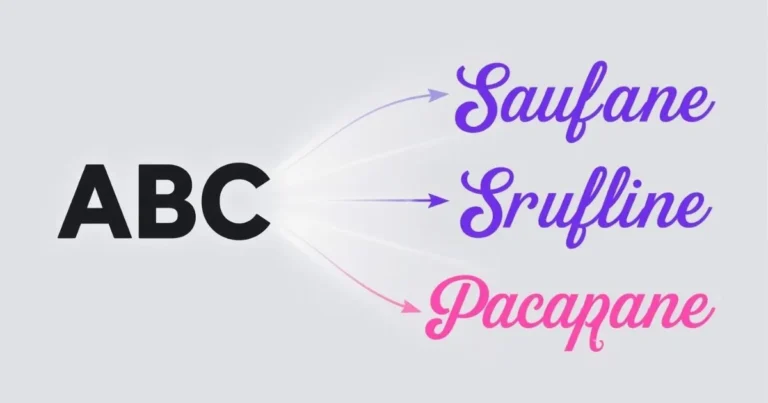
Hello might become:
𝐇𝐞𝐥𝐥𝐨
𝓗𝓮𝓵𝓵𝓸
ℍ𝕖𝕝𝕝𝕠
It is natural to assume that the tool simply changed the font.
In many copy-and-paste font generators, however, something more interesting is happening: the characters themselves are being replaced.
That difference explains why styled text can often be copied into an Instagram bio, Discord profile, Facebook post, username, or message without installing a font file.
It also explains why some styles render differently across devices, why certain characters occasionally appear as boxes, and why decorative text does not always behave like ordinary text.
Understanding the difference between a font and Unicode text makes the whole system much easier to understand.
The Short Answer: A Font Changes Appearance; Unicode Text Can Change the Characters
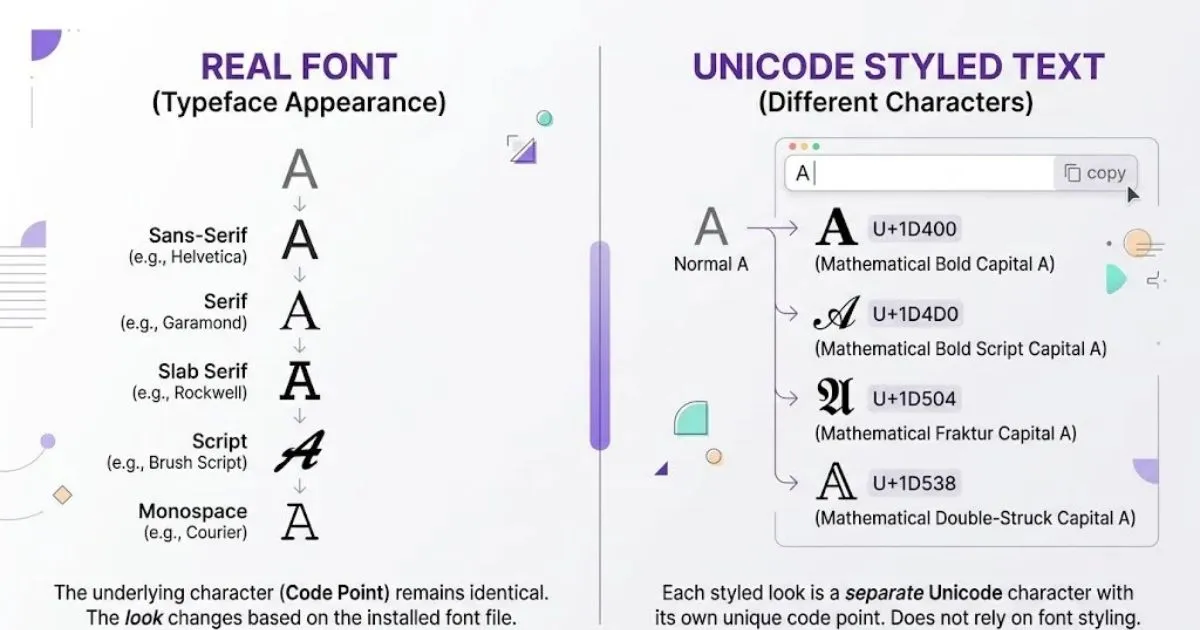
A traditional font changes how existing characters are drawn.
For example, the letter:
Acan appear very different in Arial, Georgia, Garamond, or another installed typeface.
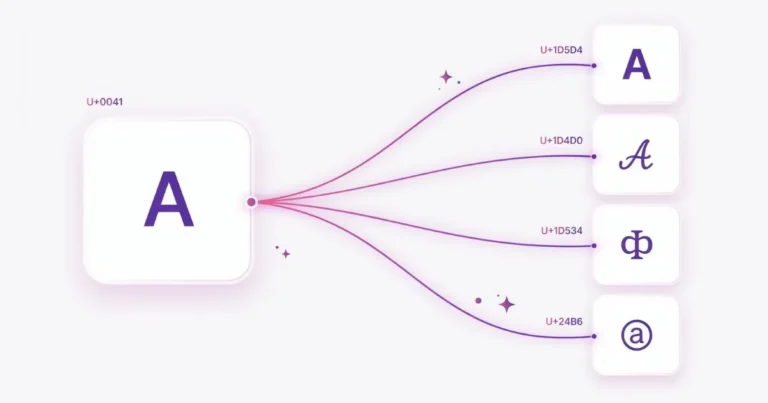
But underneath, it is still the same Unicode character:
U+0041 LATIN CAPITAL LETTER AA copy-and-paste text generator can take a different approach.
Instead of telling a browser:
Display the normal letter A using a different font.
it may output an entirely different Unicode character that already has a distinctive appearance.
For example:
A
𝐀
𝔄
𝔸
𝘈
These may look like stylistic versions of one letter, but several of them are separate encoded characters rather than ordinary A displayed through different CSS fonts.
That is the key distinction.
What Is a Real Font?
A font is a collection of glyphs—the visual shapes used to represent characters.
When a website uses CSS like this:
.example {
  font-family: Georgia, serif;
}
the text itself does not need to change.
If the HTML contains:
<p>Hello</p>the underlying word remains Hello.
The browser simply looks for glyphs in Georgia and uses them to draw those characters.
If a particular glyph is unavailable, the browser can try another font from the fallback list. Font selection can even happen character by character when the preferred font lacks a needed glyph.
So traditional font styling normally works like this:
Same characters
      ↓
Different font
      ↓
Different-looking glyphs
The data remains largely the same.
The presentation changes.
How Copy-and-Paste Font Generators Work Differently
Many social-media-style font generators need their output to survive copy and paste.
CSS cannot do that.
Imagine a website displaying:
<span style="font-family: FancyFont;">Hello</span>If you copy the word and paste it into another app, the destination usually receives the text:
HelloIt does not receive the website’s custom font file.
A Unicode text generator gets around that limitation by putting the styling into the characters being copied.
Instead of returning ordinary Hello, it may generate:
𝐇𝐞𝐥𝐥𝐨or:
𝙷𝚎𝚕𝚕𝚘The appearance travels with the copied string because those are different characters.
This is why the text can retain much of its appearance even after leaving the generator.
Where Do Those Styled Characters Come From?
Unicode contains far more than the familiar letters A–Z.
It includes writing systems, mathematical symbols, punctuation, emoji, combining marks, technical symbols, and many other character sets.
Some of the letter-like characters frequently used for copy-and-paste styles come from Mathematical Alphanumeric Symbols.
Unicode includes bold, italic, script, Fraktur, double-struck, sans-serif, monospace, and related mathematical alphabets. These characters were created primarily to preserve distinctions used in mathematical and technical notation—not originally as a social-media font system.
Over time, people discovered that those characters could also create visually distinctive plain-text strings.
That is why text that looks like:
𝑯𝒆𝒍𝒍𝒐can often be pasted somewhere that does not offer an italic font button.
Not Every Fancy Style Uses Mathematical Characters
Unicode text styling is broader than bold and script alphabets.
Some styles are created using symbols around ordinary letters:
★ H e l l o ★Others use combining marks:
H̲e̲l̲l̲o̲More extreme glitch-style text may stack several combining marks above and below characters.
Decorative transformations may also mix:
- Unicode symbols
- Mathematical alphanumerics
- Combining marks
- Enclosed characters
- Fullwidth characters
- Small-cap-like characters
- Decorative punctuation
This is why the term font generator is convenient for users but not always technically precise.
A better technical description for many of these tools would be something like a Unicode text style converter.
But most people search for “font generator,” so that remains the familiar name.
Why Can Unicode Text Be Copied but a Normal Font Cannot?
Consider two versions of the same word.
CSS-styled text
<strong>Hello</strong>Copy it into a plain-text field and you generally get:
HelloThe bold formatting was presentation.
Unicode-styled text
𝐇𝐞𝐥𝐥𝐨Copy that string and the different characters themselves are placed on the clipboard.
That is why the appearance can remain after pasting.
The destination does not need access to the original generator website.
It only needs a font capable of drawing those Unicode characters.
Why Doesn’t Every Style Look Exactly the Same Everywhere?
Unicode defines characters.
It does not force every operating system, app, browser, or font designer to draw those characters with identical pixels.
The final appearance depends partly on the fonts available on the device.
A browser may use one font for ordinary letters and fall back to another font for a symbol the first font does not contain.
That means the same styled string can appear slightly different on:
- iPhone
- Android
- Windows
- macOS
- different browsers
- different social platforms
Usually the text remains recognizable, but spacing, weight, shape, or symbol design can vary.
This is also why testing a style on the platform where you plan to use it is more useful than assuming every device will display it identically.
Why Do Some Unicode Characters Show as Boxes?
You may occasionally see something like:
□instead of the expected character.
This is commonly called a missing glyph or informally “tofu.”
It does not necessarily mean the Unicode character is invalid.
It can simply mean the device could not find an available font containing a glyph for that character.
The process is roughly:
Unicode character exists
        ↓
Preferred font checked
        ↓
Glyph unavailable
        ↓
Fallback fonts checked
        ↓
No suitable glyph found
        ↓
Missing-character box
Newer devices generally support a large number of Unicode characters, but coverage is not identical across every platform.
For a deeper explanation, see Why Unicode Characters Show as Boxes (Tofu) on Live Font Generator.
Is Unicode Styled Text the Same as Installing a Custom Font?
No.
These two approaches solve different problems.
A custom web font gives a designer much more control over:
- letter shapes
- spacing
- weights
- italics
- brand identity
- typography across a complete interface
Unicode-styled text is useful when the text itself needs to remain visually distinctive after being copied into another application.
A website designer building a polished article should normally use proper typography through CSS.
Someone creating a short Instagram bio or Discord name may prefer copy-and-paste Unicode text because CSS is not available inside those fields.
When Should You Use a Real Font?
Use a traditional font when you control the design environment.
Examples include:
- Website headings
- Blog articles
- App interfaces
- Logos
- Posters
- Graphics
- Presentations
- Long-form text
Traditional typography keeps the underlying text simple while styling it visually.
That is usually better for long passages, interface labels, and important information.
When Does Unicode Styled Text Make Sense?
Unicode styles are most useful where you cannot choose a traditional font but can paste text.
For example:
- Instagram bios
- Social media captions
- Discord profiles
- Display names
- Gaming communities
- Short decorative messages
- Profile descriptions
The important word is decorative.
A fancy-looking profile name and an important instruction are not the same use case.
Plain text is generally the safer option when readability and accessibility are more important than visual decoration.
What About Search and Accessibility?
Because Unicode-styled letters can be different characters rather than ordinary Latin letters with visual formatting, software does not always treat them exactly like the plain-text version.
For example:
Helloand:
𝐇𝐞𝐥𝐥𝐨look closely related to a person.
Computers can see two different character sequences.
This can matter for:
- Search
- Screen readers
- Text comparison
- Usernames
- Form validation
- Character limits
- Copying and editing
That does not mean decorative Unicode is inherently bad.
It means it should be used where decoration is appropriate rather than replacing every piece of important text.
Why Passwords and Usernames Need Extra Care
A visually unusual character may not be equivalent to the ordinary letter it resembles.
Two strings that look almost identical can therefore be technically different.
This matters more in usernames, passwords, account identifiers, and other fields where exact character matching is important.
If you are using styled text around accounts or identifiers, read our guide to Unicode Fonts, Passwords and Usernames before assuming visually similar characters will be treated as identical.
A Quick Way to Tell Whether the Characters Actually Changed
You can test this in JavaScript.
const normal = "A";
const styled = "𝐀";

console.log(normal === styled);
// false
They are visually related but not the same string.
You can also inspect code points:
for (const character of "A𝐀") {
  console.log(
    character,
    "U+" + character
      .codePointAt(0)
      .toString(16)
      .toUpperCase()
  );
}
That makes the distinction much easier to see.
Font Generator vs Real Font: The Difference at a Glance
| Feature | Traditional Font | Unicode Styled Text |
|---|---|---|
| Changes underlying characters | Usually no | Often yes |
| Uses CSS/font software | Yes | Not required for copying |
| Can survive plain-text copy/paste | Styling usually does not | Often yes |
| Designer controls exact glyph design | More control | Depends on device fonts |
| Suitable for long-form reading | Usually yes | Usually better used sparingly |
| Useful in social profile fields | Only if platform provides font controls | Often |
| Appearance can vary by device | Yes | Yes, sometimes more noticeably |
So What Does a Font Generator Actually Change?
For many copy-and-paste font generators, the answer is:
It changes the text data, not simply the font setting.
Your original letters are mapped to other Unicode characters or combined with symbols and marks that create a different visual style.
That is why you can copy the result.
It is also why the output behaves differently from ordinary typography.
The distinction may sound technical, but it explains nearly every common question about fancy text:
Why can I paste it into a bio?
Why does it look slightly different on another phone?
Why did a character become a square?
Why does a screen reader handle it differently?
Why isn’t it identical to selecting a font in Word or Photoshop?
Because a copy-and-paste font generator and a traditional font are solving two different problems.
Final Takeaway
A traditional font says:
Keep these characters and draw them differently.
A Unicode text generator can say:
Replace these characters with different ones that already look different.
That difference is the foundation of copy-and-paste fancy text.
If you’re experimenting with a social profile, username, caption, or Discord text, Unicode styles can be a convenient creative option.
If you’re designing an interface, writing important information, or publishing long-form content, proper fonts and CSS usually provide better control.
Neither approach replaces the other.
They simply work at different layers of text.